Why LaunchDeck Is the Right Launchpad Replacement for macOS 26
Why LaunchDeck Is the Right Launchpad Replacement for macOS 26
Why LaunchDeck Is the Right Launchpad Replacement for macOS 26
Why LaunchDeck Is the Right Launchpad Replacement for macOS 26
Why LaunchDeck Is the Right Launchpad Replacement for macOS 26
Why LaunchDeck Is the Right Launchpad Replacement for macOS 26
LaunchDeck brings back visual app launching on the Mac with a native experience, flexible organization, and a modern interface built for macOS 26.
LaunchDeck brings back visual app launching on the Mac with a native experience, flexible organization, and a modern interface built for macOS 26.
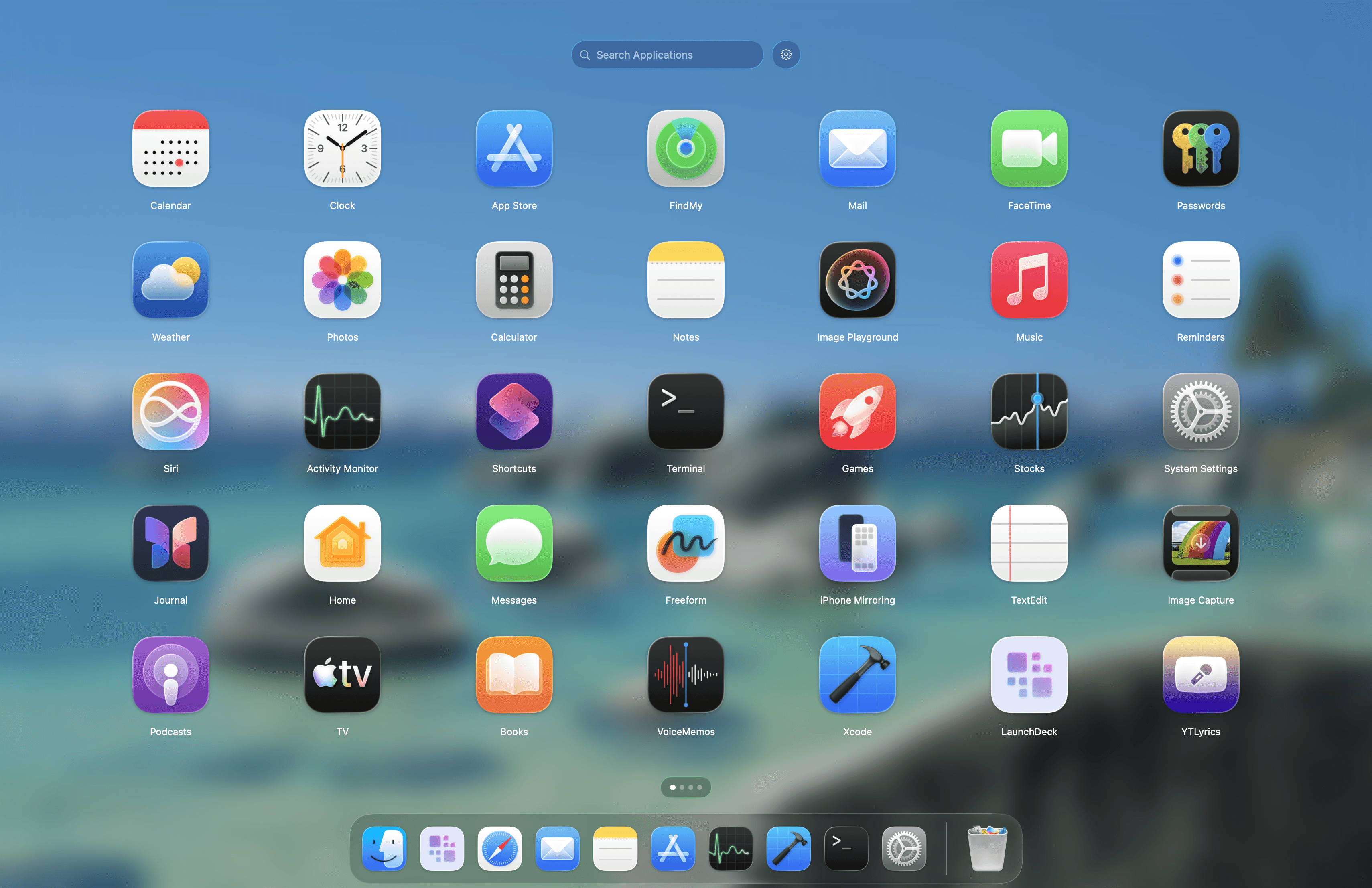
When Apple removed Launchpad from macOS 26, many users felt the loss more than expected. Launchpad was never just a screen full of icons. It was a fast, visual, familiar way to open apps, group them into folders, and keep everything within reach without relying on search every time.
When Apple removed Launchpad from macOS 26, many users felt the loss more than expected. Launchpad was never just a screen full of icons. It was a fast, visual, familiar way to open apps, group them into folders, and keep everything within reach without relying on search every time.
LaunchDeck was created precisely to fill that gap. It is a native launcher for macOS 26, built to bring back the familiar Launchpad experience while making it more modern, more flexible, and more pleasant to use every day.
LaunchDeck was created precisely to fill that gap. It is a native launcher for macOS 26, built to bring back the familiar Launchpad experience while making it more modern, more flexible, and more pleasant to use every day.
LaunchDeck is not trying to replace your entire Mac. It does not try to become a file manager, an automation tool, a command palette, or an overloaded all-in-one utility. Its purpose is much more focused: to give users a better space for launching apps, one that feels natural inside macOS and stays aligned with the platform’s visual and behavioral language.
LaunchDeck is not trying to replace your entire Mac. It does not try to become a file manager, an automation tool, a command palette, or an overloaded all-in-one utility. Its purpose is much more focused: to give users a better space for launching apps, one that feels natural inside macOS and stays aligned with the platform’s visual and behavioral language.
That is exactly where its biggest strength lies. LaunchDeck remains a launcher at its core: visual, fast, clear, and focused. But being focused does not mean being limited. The app already includes a strong set of features for organizing and launching apps, and it will continue to evolve over time. More settings, refinements, and capabilities can be added, but the direction stays the same: every improvement should strengthen the native Launchpad experience, not turn it into something bloated, foreign, or unnecessarily complicated.
That is exactly where its biggest strength lies. LaunchDeck remains a launcher at its core: visual, fast, clear, and focused. But being focused does not mean being limited. The app already includes a strong set of features for organizing and launching apps, and it will continue to evolve over time. More settings, refinements, and capabilities can be added, but the direction stays the same: every improvement should strengthen the native Launchpad experience, not turn it into something bloated, foreign, or unnecessarily complicated.
Why LaunchDeck still matters in the age of search
Why LaunchDeck still matters in the age of search
Why LaunchDeck still matters in the age of search
Why LaunchDeck still matters in the age of search
The Mac already has Spotlight, and many users also rely on tools like Alfred or Raycast. Those tools are excellent when you know exactly what you want to open and are ready to type for it.
The Mac already has Spotlight, and many users also rely on tools like Alfred or Raycast. Those tools are excellent when you know exactly what you want to open and are ready to type for it.
But the visual workflow still matters. Sometimes it is faster to spot an app than to remember its name. Sometimes it is more comfortable to organize apps into folders by task or context. Sometimes you simply want to open something from a group of tools without entering a search-first mindset. That is exactly where Launchpad used to shine, and that is the experience LaunchDeck brings back to macOS 26.
But the visual workflow still matters. Sometimes it is faster to spot an app than to remember its name. Sometimes it is more comfortable to organize apps into folders by task or context. Sometimes you simply want to open something from a group of tools without entering a search-first mindset. That is exactly where Launchpad used to shine, and that is the experience LaunchDeck brings back to macOS 26.
LaunchDeck gives you not only search, but also the things that made Launchpad valuable in the first place: visual orientation, organized space, a sense of order, and fast access to all of your installed apps.
LaunchDeck gives you not only search, but also the things that made Launchpad valuable in the first place: visual orientation, organized space, a sense of order, and fast access to all of your installed apps.
A native approach instead of an overloaded launcher
A native approach instead of an overloaded launcher
A native approach instead of an overloaded launcher
A native approach instead of an overloaded launcher
The most important thing about LaunchDeck is its philosophy. It is not an app that tries to do everything. It does not dilute its purpose by sending users into ten different workflows at once. Instead, LaunchDeck takes one very specific experience, launching and organizing apps, and brings it to a much higher level.
The most important thing about LaunchDeck is its philosophy. It is not an app that tries to do everything. It does not dilute its purpose by sending users into ten different workflows at once. Instead, LaunchDeck takes one very specific experience, launching and organizing apps, and brings it to a much higher level.
At the same time, focused does not mean barebones. LaunchDeck already includes the core functionality that makes a visual launcher genuinely useful every day:
At the same time, focused does not mean barebones. LaunchDeck already includes the core functionality that makes a visual launcher genuinely useful every day:
fullscreen mode;
fullscreen mode;
windowed mode;
windowed mode;
global hotkey activation;
global hotkey activation;
trackpad gesture activation;
trackpad gesture activation;
folders and drag-and-drop organization;
folders and drag-and-drop organization;
custom app renaming;
custom app renaming;
hiding unwanted apps;
hiding unwanted apps;
quick right-click actions;
quick right-click actions;
haptic feedback;
haptic feedback;
menu bar access;
menu bar access;
launch at login;
launch at login;
automatic update checks;
automatic update checks;
broad language support.
broad language support.
This is exactly the kind of product that can grow without losing its character. LaunchDeck can gain more settings, more refinement, and more features over time, but its purpose remains unchanged: it should stay a native Launchpad for modern macOS, not turn into a generic control center for everything on your machine.
This is exactly the kind of product that can grow without losing its character. LaunchDeck can gain more settings, more refinement, and more features over time, but its purpose remains unchanged: it should stay a native Launchpad for modern macOS, not turn into a generic control center for everything on your machine.
Fullscreen mode and windowed mode
Fullscreen mode and windowed mode
Fullscreen mode and windowed mode
Fullscreen mode and windowed mode
One of the most interesting things about LaunchDeck is that it offers two different ways to interact with the launcher.
One of the most interesting things about LaunchDeck is that it offers two different ways to interact with the launcher.
In fullscreen mode, it feels closer to the classic Launchpad experience: a dedicated space where you can see all your apps, move between pages, open folders, and navigate visually through your setup.
In fullscreen mode, it feels closer to the classic Launchpad experience: a dedicated space where you can see all your apps, move between pages, open folders, and navigate visually through your setup.
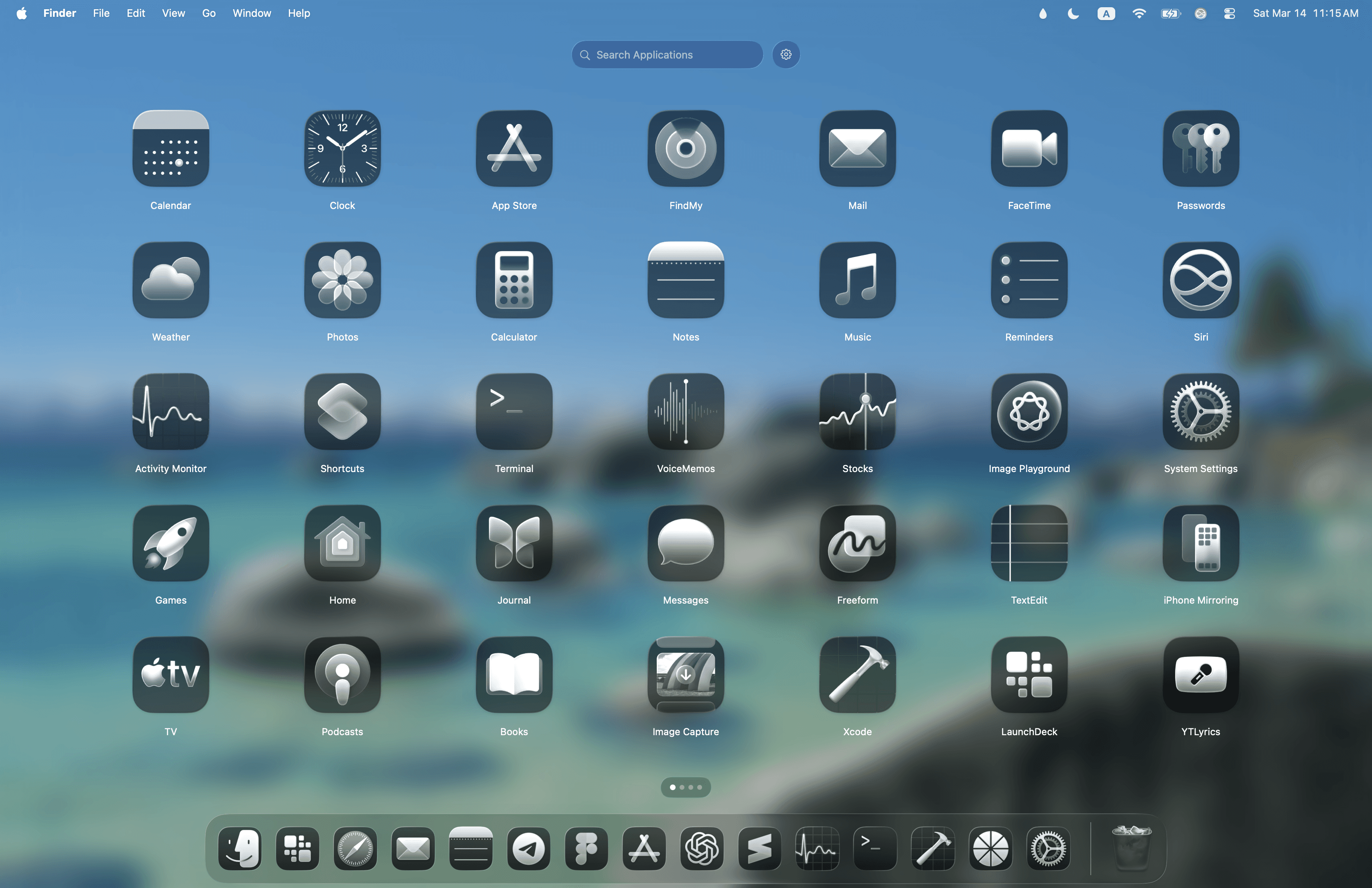
Fullscreen mode
Fullscreen mode
But the windowed mode is just as important. It turns LaunchDeck into a compact launch panel that appears on top of your current workflow without requiring a full context switch. In practice, it feels a bit like the Start menu in Windows 11: a compact, centered launcher panel for quick app access, but designed in a way that still feels fully at home on macOS.
But the windowed mode is just as important. It turns LaunchDeck into a compact launch panel that appears on top of your current workflow without requiring a full context switch. In practice, it feels a bit like the Start menu in Windows 11: a compact, centered launcher panel for quick app access, but designed in a way that still feels fully at home on macOS.
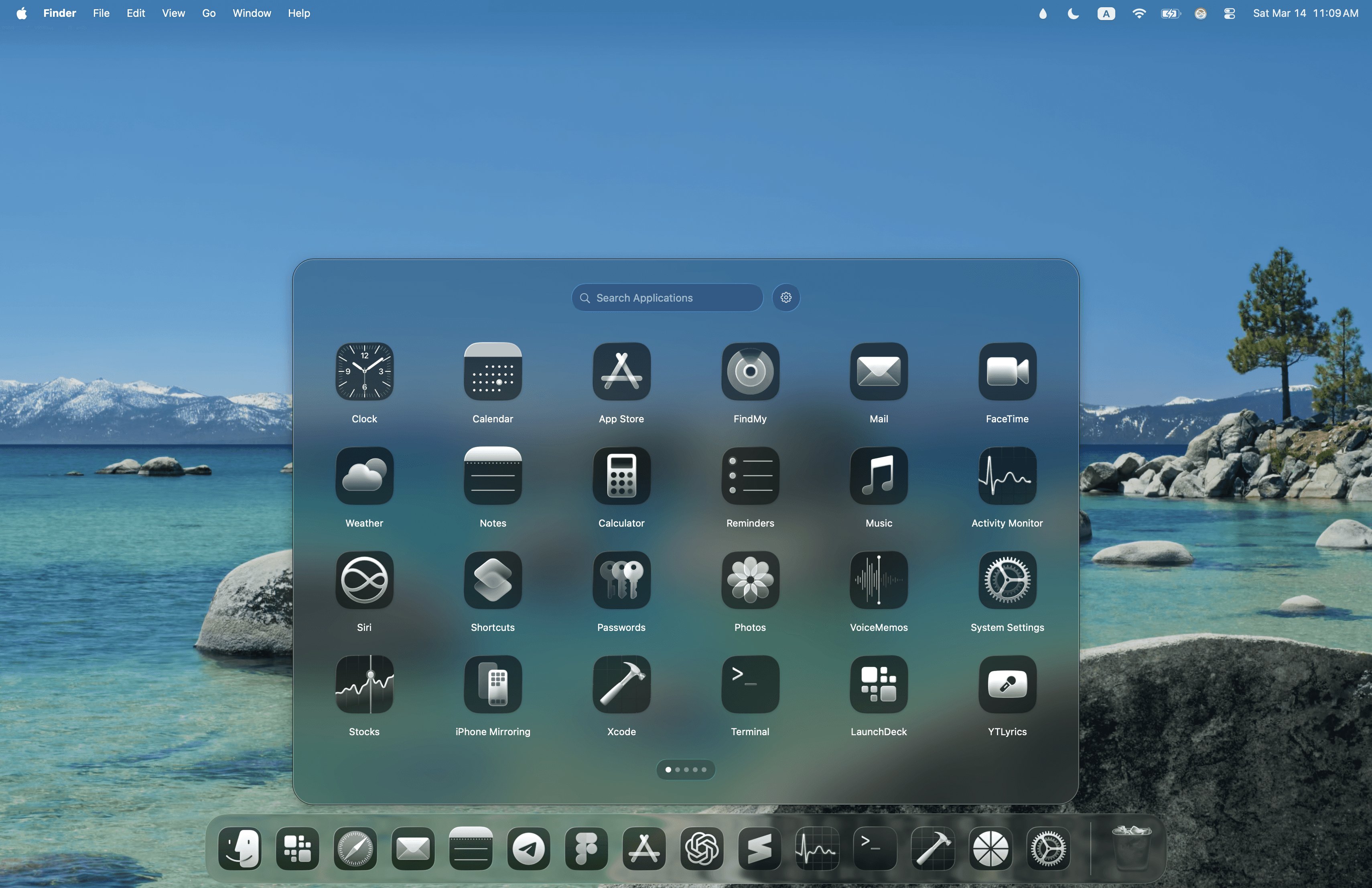
Windowed mode
Windowed mode
That flexibility matters. Some users prefer the full immersive grid. Others want something lighter and faster to pop open in a window. LaunchDeck does not force one model as the “correct” one. It supports both, while keeping the product consistent in spirit.
That flexibility matters. Some users prefer the full immersive grid. Others want something lighter and faster to pop open in a window. LaunchDeck does not force one model as the “correct” one. It supports both, while keeping the product consistent in spirit.
Liquid Glass and the feel of modern macOS 26
Liquid Glass and the feel of modern macOS 26
Liquid Glass and the feel of modern macOS 26
Liquid Glass and the feel of modern macOS 26
The visual side of LaunchDeck matters too. In macOS 26, Apple introduced a new interface material called Liquid Glass. Apple describes it as a translucent material that reflects and refracts its surroundings, dynamically adapts to content, and helps bring greater focus to what matters on screen. It is one of the key visual ideas behind the new design language across Apple platforms, including macOS Tahoe 26.
The visual side of LaunchDeck matters too. In macOS 26, Apple introduced a new interface material called Liquid Glass. Apple describes it as a translucent material that reflects and refracts its surroundings, dynamically adapts to content, and helps bring greater focus to what matters on screen. It is one of the key visual ideas behind the new design language across Apple platforms, including macOS Tahoe 26.
For LaunchDeck, support for Liquid Glass is not about adding visual flair for its own sake. It is about preserving native feel. If a user opens a modern launcher on macOS 26, it should feel like it belongs in the same world as the system itself. It should not look like an older, unrelated interface dropped into a newer version of macOS. It should feel visually in conversation with the platform.
For LaunchDeck, support for Liquid Glass is not about adding visual flair for its own sake. It is about preserving native feel. If a user opens a modern launcher on macOS 26, it should feel like it belongs in the same world as the system itself. It should not look like an older, unrelated interface dropped into a newer version of macOS. It should feel visually in conversation with the platform.
That is why Liquid Glass in LaunchDeck is not just a decorative effect. It helps the app stay aligned with the visual language of macOS 26. That matters because it keeps the experience feeling natural. LaunchDeck does not fight the system’s design direction. It continues it. The result is a launcher that feels less like a layer on top of the Mac and more like a natural extension of what Launchpad could have become if Apple had chosen to keep evolving it.
That is why Liquid Glass in LaunchDeck is not just a decorative effect. It helps the app stay aligned with the visual language of macOS 26. That matters because it keeps the experience feeling natural. LaunchDeck does not fight the system’s design direction. It continues it. The result is a launcher that feels less like a layer on top of the Mac and more like a natural extension of what Launchpad could have become if Apple had chosen to keep evolving it.
Organization without unnecessary weight
Organization without unnecessary weight
Organization without unnecessary weight
Organization without unnecessary weight
One of LaunchDeck’s strengths is that it feels organized without feeling heavy. Users can create folders, arrange apps manually, hide what they do not need, rename apps, and build a structure that fits the way they work. Yet the interface itself stays clean. It does not get buried under extra sidebars, secondary panels, or too many conceptual layers.
One of LaunchDeck’s strengths is that it feels organized without feeling heavy. Users can create folders, arrange apps manually, hide what they do not need, rename apps, and build a structure that fits the way they work. Yet the interface itself stays clean. It does not get buried under extra sidebars, secondary panels, or too many conceptual layers.
That is especially valuable for people who like order but do not want app organization to become a project in itself. LaunchDeck helps shape the environment once, then gets out of the way so you can simply use it every day.
That is especially valuable for people who like order but do not want app organization to become a project in itself. LaunchDeck helps shape the environment once, then gets out of the way so you can simply use it every day.
Why LaunchDeck matters now
Why LaunchDeck matters now
Why LaunchDeck matters now
Why LaunchDeck matters now
After the changes in macOS 26, several Launchpad alternatives appeared. That was inevitable. When the system removes a familiar workflow, other products naturally try to take its place. But in that environment, what matters is not just what a launcher can do, but what kind of product it wants to be.
After the changes in macOS 26, several Launchpad alternatives appeared. That was inevitable. When the system removes a familiar workflow, other products naturally try to take its place. But in that environment, what matters is not just what a launcher can do, but what kind of product it wants to be.
Some alternatives lean into maximum feature count and become something closer to a separate workspace. Others focus heavily on customization. Some simply try to recreate the basic grid and stop there.
Some alternatives lean into maximum feature count and become something closer to a separate workspace. Others focus heavily on customization. Some simply try to recreate the basic grid and stop there.
LaunchDeck takes a more deliberate path. It is not trying to be the most overloaded or the most experimental option. Its goal is more precise: to bring Launchpad back in a way that feels modern, polished, and native. It keeps what people loved about a visual launcher on the Mac, then improves the experience in the ways that actually matter: windowed mode, gesture-based launching, haptics, flexible organization, support for modern macOS visuals, and continued evolution without losing focus.
LaunchDeck takes a more deliberate path. It is not trying to be the most overloaded or the most experimental option. Its goal is more precise: to bring Launchpad back in a way that feels modern, polished, and native. It keeps what people loved about a visual launcher on the Mac, then improves the experience in the ways that actually matter: windowed mode, gesture-based launching, haptics, flexible organization, support for modern macOS visuals, and continued evolution without losing focus.
LaunchDeck as a continuation of Launchpad
LaunchDeck as a continuation of Launchpad
LaunchDeck as a continuation of Launchpad
LaunchDeck as a continuation of Launchpad
In the end, LaunchDeck is not just a replacement for a removed feature. It is an attempt to carry the idea of Launchpad forward and make it fit modern macOS better than ever.
In the end, LaunchDeck is not just a replacement for a removed feature. It is an attempt to carry the idea of Launchpad forward and make it fit modern macOS better than ever.
It preserves the essentials: visual launching, folders, order, fast access, and a clear interface.
It preserves the essentials: visual launching, folders, order, fast access, and a clear interface.
It adds what was genuinely missing: global activation, a useful windowed mode, more flexible organization, better alignment with macOS 26’s design language, and room for thoughtful growth without losing the core idea.
It adds what was genuinely missing: global activation, a useful windowed mode, more flexible organization, better alignment with macOS 26’s design language, and room for thoughtful growth without losing the core idea.
Most importantly, it stays true to its nature. LaunchDeck does not want to become something extra. It wants to be the native Mac launcher many users are still missing.
Most importantly, it stays true to its nature. LaunchDeck does not want to become something extra. It wants to be the native Mac launcher many users are still missing.
© 2026
Hirsch Studio.
All rights reserved.
© 2026
Hirsch Studio.
All rights reserved.
© 2026
Hirsch Studio.
All rights reserved.
© 2026
Hirsch Studio.
All rights reserved.
© 2026
Hirsch Studio.
All rights reserved.